Design a streak calendar people can recover from
Define what counts as a day, show completed and missed days clearly, and decide how a freeze changes the count. Use the historical Duolingo screens for the visible patterns they demonstrate; the recovery rules below are a proposed design, not a claim about Duolingo’s current behavior.
Write the counting rule first
A streak becomes confusing when the calendar and the number disagree. I would settle the rule before designing the flame.
Write down the qualifying action, the timezone used to assign a day, the cutoff, and what happens when an offline action arrives late. Decide whether travel changes the timezone immediately or at the next boundary. These are product decisions; the screenshots cannot answer them for you.
For a proposed learning app, one completed lesson might qualify a day. Opening the app would not. That example is a design choice, not a universal definition or a claim about Duolingo.
What the Duolingo evidence shows
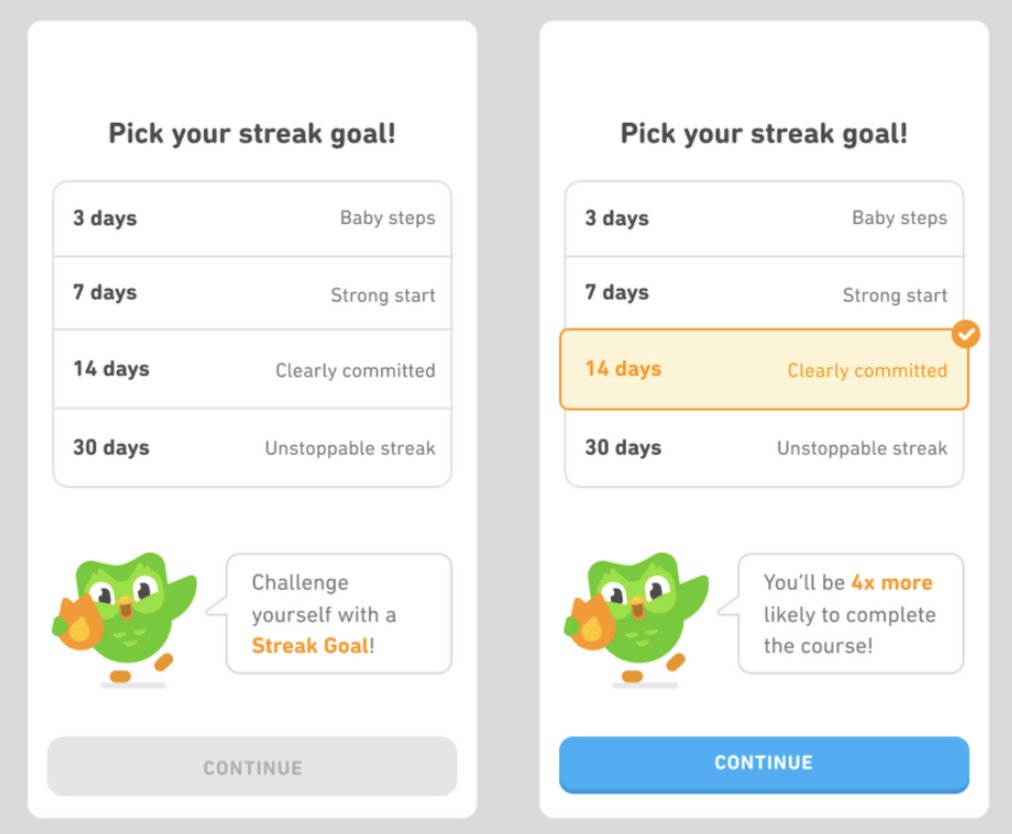
The November 2022 source describes removing a preselected streak goal and asking learners to choose. Ali reported better retention after the interaction, without publishing a numerical effect size or an experiment dataset. The screenshots show the picker’s selected and unselected states; they cannot identify whether a visible selection came from a default or a tap. [1]
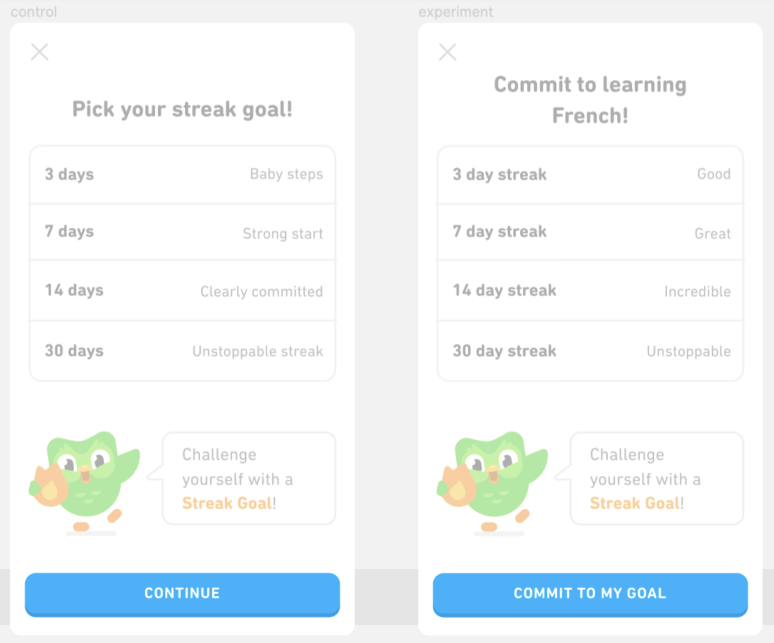
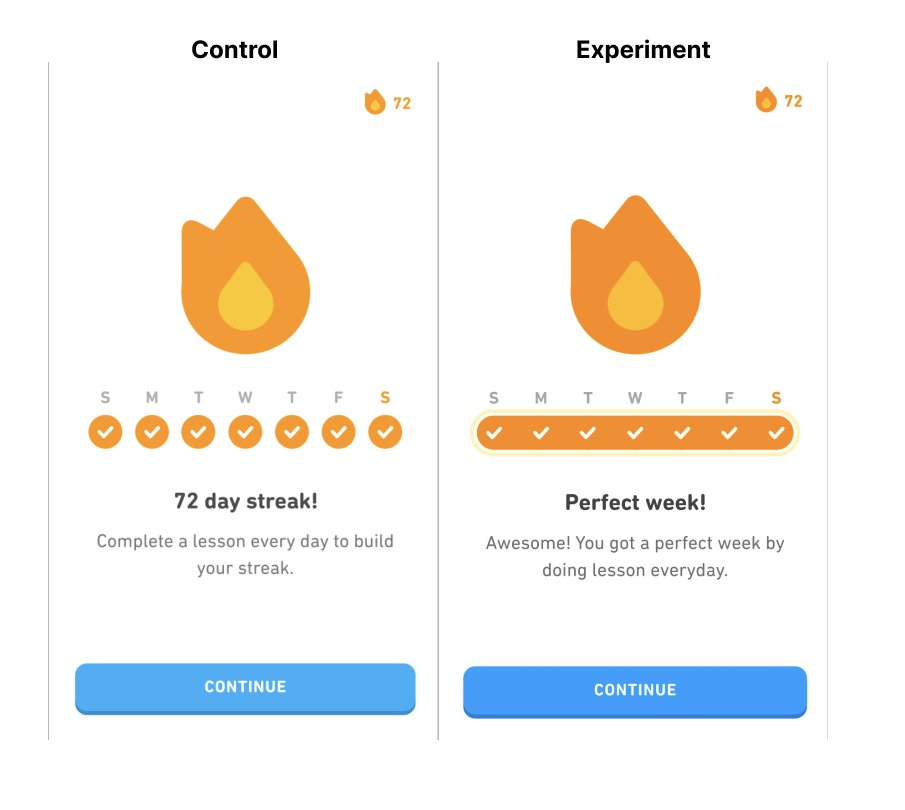
The February 2023 source discusses reminder widgets, a streak-themed app icon, commitment wording, and Perfect Streak Week. The images show a goal-copy comparison and a seven-day completion row. Treat them as historical references. They do not establish current behavior, freeze rules, or a retention result for your product. [2]
Map the states before drawing the calendar
| State | What the user needs to see | Evidence or proposed rule |
|---|---|---|
| No goal chosen | The available goals and whether continuing requires a choice | Captured Duolingo selected/unselected picker [1] |
| Day completed | A completion marker and the date it represents | Seven completed days visible in the historical weekly comparison [2] |
| Today incomplete | A distinct today marker and the remaining opportunity to act | Proposed; this guide has no captured incomplete-day calendar |
| Week completed | The full week plus a concise celebration | Captured Perfect week comparison [2] |
| Protected missed day | A freeze marker distinct from a completed lesson | Proposed; no freeze screen in this evidence set |
| Unprotected missed day | The break, the resulting count, and a clear next action | Proposed; no recovery screen in this evidence set |
| Late offline action | A pending state until the server accepts or rejects the day | Proposed implementation behavior |
Do not color a protected day exactly like a completed day. A user should be able to tell whether they practiced or used protection. If a freeze preserves the streak, say whether it is consumed automatically, how many remain, and when the result is final.
Make recovery a decision the user can understand
For a proposed recovery rule, start with three branches. A missed day with an eligible freeze consumes one freeze and leaves the count unchanged. The next qualifying day increments that count by one; the protected day remains visually distinct from a practice day. A missed day without protection breaks the streak. A late completion remains pending until the day’s eligibility is resolved. Record those transitions once and render the calendar and count from the same result.
Before adopting that rule, decide what happens after two missed days, when a freeze is bought after the cutoff, or when the learner changes timezone. If the product does not support a repair, do not show a repair button that leads nowhere. These are design questions to resolve with your product team; this guide is not documenting a Duolingo entitlement.
Keep commitment and counting separate
In the captured copy comparison, Continue becomes Commit to my goal while the headline and option labels also change. You cannot attribute an outcome to the button alone. [2]
If you test a required goal choice, keep the rest of the offer stable where possible. Measure completed lessons and return behavior over a declared window, alongside picker abandonment and notification opt-outs. A higher selected goal is an intermediate response. It does not establish that the learner practiced more.
Give your coding agent a complete brief
Use the historical screens as visual references, then supply the decisions your product owns:
Build a weekly streak calendar from a single daily-state model. Use my qualifying action, timezone, cutoff, freeze eligibility, and late-sync rules. Show completed, today-incomplete, protected, missed, and pending days with accessible labels. Keep the streak count consistent with those states. Ask for any missing rule before implementing it. Use the cited Duolingo screens only for the states they actually show.
Use Connect Lazyweb below to research additional captured states in your coding agent. If a recovery reference is unavailable, label the design as proposed instead of manufacturing a product screenshot.
Check cases the happy path misses
- Complete two qualifying actions on the same day. The day should count once.
- Cross midnight during a lesson. Apply the declared timestamp rule.
- Miss a day with one freeze, then miss another with none. Verify both the count and markers.
- Sync a late lesson after the calendar already showed a break. Verify the stated reconciliation behavior.
- Change timezone while traveling. Check that the chosen rule does not silently count the same day twice.
- Read the week with a screen reader and with color removed. The state should remain understandable.
Keep the expected result for each case in the brief. A calendar that looks right on a perfect week has not yet answered the recovery questions.
Sources & citations
- [1] Ali Abouelatta: Duolingo streak goals, November 21, 2022 Open source. Historical author account; qualitative outcome, no numerical effect-size dataset. ↩
- [2] Ali Abouelatta: Duolingo retention experiments, February 6, 2023 Open source. Historical 2022 experiments described in 2023. Screen contents visually checked October 7, 2026. ↩
Source: Lazyweb Research — proprietary analysis of real, in-market app screens. Cite as Lazyweb Research, 2026-10-07.